


Choosing a Content Management System (CMS) is a critical choice for your website. A CMS determines how easy it is to maintain your site, the possibilities in terms of design and functionality, and how easily you can publish content. Moreover, switching to a different CMS later on is a stressful, time-consuming, and costly affair. It’s something you want to avoid if possible. You want to build your site on a platform that you can trust for many years with reasonable confidence.
WordPress and Joomla are two of the most well-known dominant open-source platforms of the past two decades. Both systems run on PHP and use a MySQL database.
In this article, I offer you a detailed comparison based on functionality, security, and management. This should make it a lot easier for you to choose the right CMS for your site.
Market Share and Popularity
The CMS landscape looks quite different than it did 10-15 years ago. WordPress has a market share of about 64% within the CMS market. 43% of the entire internet runs on WordPress. Joomla’s market share is considerably more modest: as of 2025, it is less than 3%.
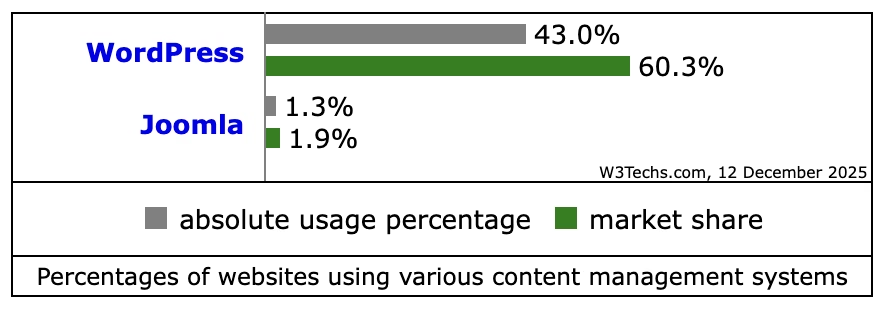
The trend line for Joomla is declining. The platform is losing ground to both WordPress and website builders like Squarespace and Wix. WordPress, on the other hand, shows stable growth and is the first platform most people think of when it comes to a CMS.
A large market share has direct consequences for the overall attractiveness of a CMS. There is more documentation (both knowledge bases, blogs, and YouTube videos) available, making it much easier to get a site up and running and maintained. Bugs and security vulnerabilities are quickly noticed by the huge community. For the long term, WordPress offers more assurance in terms of support and further development.
Winner: WordPress
Ease of Use and Learning Curve
Hosting providers such as my.host offer “one-click” installations for both systems. It doesn’t matter if you use Joomla or WordPress here. The main difference lies in the daily operation and the interface.
WordPress’s dashboard is designed for non-technical end-users. The interface is minimalist. Menus like “Posts,” “Pages,” and “Appearance” are self-explanatory. With the introduction of the Gutenberg editor, content management has become much more visual and easier. Users can directly see how the content looks while editing. Most users should be able to get the hang of WordPress after a focused weekend.
Joomla has a somewhat steeper learning curve and focuses on developers or webmasters. The control panel contains many technical terms and configuration options. Posting content requires insight into the structure of “Modules” and “Positions.” Creating a menu item takes several steps: first the article, then the menu link, then the module assignment. This provides flexibility, but it considerably slows the workflow for beginners.
Winner: WordPress
Content Management and Blogging
Both systems were originally developed for different purposes. This is still clearly evident in how they handle content publishing.
WordPress started as a blog platform. Blogging functionality is 100% embedded in the platform. Features like categories and tags work right away. You can see a clear difference between time-bound content (Posts) and static content (Pages). You have a lot of freedom regarding the layout and design of your blog articles.
Joomla has a different philosophy. All content is called “Articles,” but you can easily categorize them. You can nest categories indefinitely (for example: Products > Hardware > Laptops > Gaming). This hierarchy is directly reflected in URLs and navigation without additional plugins. In terms of design, you have many options, but it is slightly less user-friendly than WordPress.
A unique feature is template assignment. In WordPress, you use a single theme for the entire website. In Joomla, you can assign a completely different template per menu item. This way, the homepage can have a completely different layout and style than the news section, managed from the standard settings.
Joomla has “Custom Fields” built into the core. This allows administrators to easily add extra data to articles without plugins. In WordPress, an external plugin like Advanced Custom Fields (ACF) is needed for this.
Winner: WordPress
Design and Functionality (Themes and Plugins)
Themes and plugins are largely responsible for the design possibilities and functionality of your website. You want a CMS that offers a wide and well-maintained range of both.
Themes and Templates
The WordPress Repository contains more than 11,000 free and freemium themes. There is also a large market for purely commercial themes (via ThemeForest, etc.).
On top of that, there’s a huge market for child themes: they are themes that users build on top of an existing theme (popular themes like Kadence and Divi offer possibilities for this).
Joomla works with “Templates.” There is no central, official directory in the dashboard. Users rely on external developers and marketplaces. The supply is considerably smaller, and the quality varies more. For customizing templates in Joomla, you often need knowledge of PHP and CSS overrides.

Plugins and Extensions
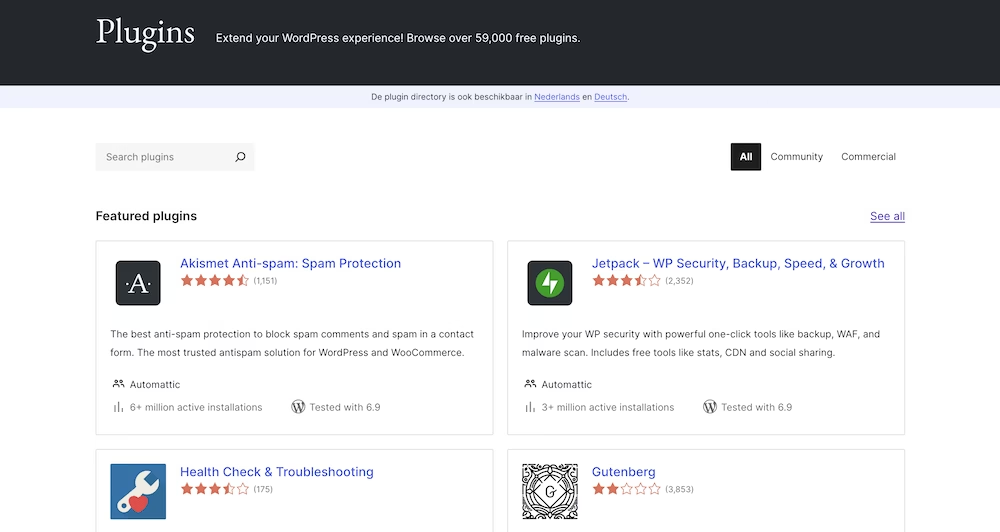
WordPress has over 59,000 plugins in the official library. For almost every functionality (SEO, forms, caching), a free solution is available. The risk of this is “plugin bloat”: too many plugins can slow down the site.
Joomla divides extensions into Components, Modules, and Plugins. The Joomla Extensions Directory contains about 6,000 extensions. Many important functionalities that are free in WordPress are paid extensions in the Joomla ecosystem.
Winner: WordPress
Ecommerce Capabilities
If you are going to build a webshop or want to add a webshop to your site at some point, you want your CMS to offer good ecommerce support.
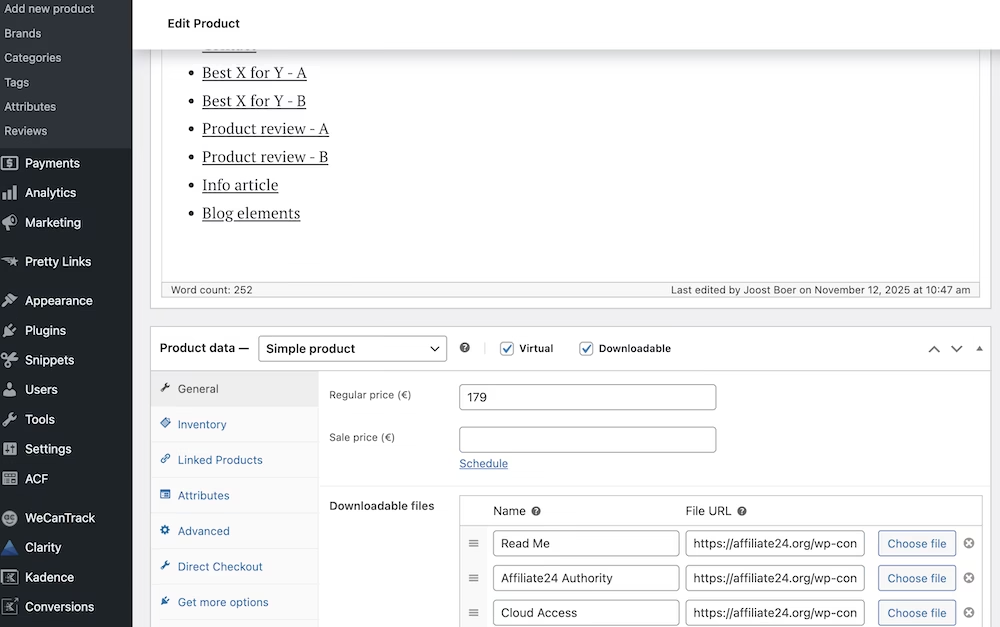
WooCommerce is the standard for ecommerce on WordPress. It is the most widely used ecommerce platform in the world. The integration is seamless, and there are thousands of add-ons for shipping, marketing, and administration. For Dutch users, integrations with accounting software and iDEAL (via Mollie) are standard available.
You can click WooCommerce into your WordPress site in the form of a free plugin.
Joomla does not have an official own shop solution in the core. Users rely on third-party extensions, such as VirtueMart, HikaShop, or J2Store. These systems are powerful, but the configuration is more complex than WooCommerce. Finding specific connectors (for example, with a niche shipping service) is more challenging.
Winner: WordPress
SEO (Search Engine Optimization)
Both platforms generate search engine-friendly pages, but the approach is different.
Joomla has strong SEO functionality built into the core. Users can add meta descriptions and keywords without extra extensions. Forcing SSL (HTTPS) and Gzip compression can also be done directly from the general settings. The URL structure is less strong, sometimes being less clean without advanced configuration.
WordPress SEO relies heavily on plugins. The core features are basic, but plugins like Yoast SEO or Rank Math offer advanced options. These plugins analyze content for readability and keywords. Technical aspects such as sitemaps, robots.txt, and schema markup are automated by these plugins. For non-technical users, the WordPress route is usually more effective.
Winner: WordPress
Security and Maintenance
WordPress is the largest target for hackers due to its market share. However, most vulnerabilities are not found in the core software but in outdated plugins and themes. These issues are generally easy to fix with basic WordPress maintenance. The WordPress security team quickly releases patches. Joomla has a very good reputation for security but is not immune. A downside with Joomla is that core updates sometimes include “breaking changes,” causing extensions to stop working.
Joomla has Two-Factor Authentication (2FA) built into the system by default. It also offers advanced options for managing PHP settings per directory. With WordPress, you need plugins for features like 2FA or advanced firewalls.
Winner: Tie
Backups and Updates
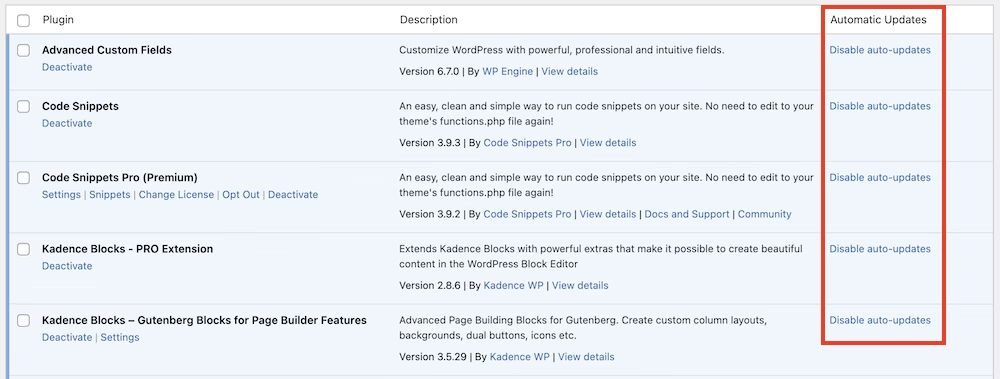
WordPress offers the ability to fully automate updates for the core, themes, and plugins. Especially with simple websites, this means you spend practically no time on website maintenance. In Joomla, manual oversight is often required during updates due to compatibility risks.
Through the hosting panel of my.host, daily backups are available for both systems.
Winner: Tie
Multilingualism and Localization
This is an area where the platforms fundamentally differ and where one platform has a clear advantage over the other.
Joomla supports multilingualism out-of-the-box. No additional extensions are needed to offer a site in Dutch, English, and German. The management of translations and language switches is embedded in the core.
WordPress supports only one language per installation by default. For multilingual WordPress websites, you need a plugin like WPML, Polylang, or TranslatePress. A plugin like Polylang works excellently but also adds extra code and complexity to the site. For heavy multilingual enterprise sites, Joomla has a clear advantage here.
In my opinion, WordPress falls short here significantly, and many, including myself, would love to see multilingualism become part of the WordPress core sooner rather than later.
Winner: Joomla
Costs and Development
The software itself is open-source and free in both cases.
Development Costs (for custom work)
There are countless WordPress developers to be found. Rates are competitive due to the size of the ecosystem. Maintaining a standard WordPress site requires practically no time.
Joomla experts have become scarcer over the years. The hourly rate for specialized Joomla developers is therefore usually higher. Since maintenance and updates are more complex, the operational costs (TCO) are often higher in the long term.
Hosting Requirements
You can install both platforms on almost any hosting package.
Winner: Joomla
Conclusion
In my opinion, WordPress wins in almost all important areas over Joomla. With its ever-shrinking market share, it feels a bit like a sinking ship.
Nevertheless, there are a few situations where Joomla can be a good choice:
- Complex, custom data structures are needed that don’t fit into standard posts.
- The website needs to be multilingual directly without using plugins.
- There is a need for very advanced user management (ACL) in the core.
- The administrator is technically skilled and wants full control over the configuration.
But for 95% of business websites, blogs, and webshops, WordPress is the best choice. The ecosystem is huge, and the software develops faster than the competition.
Whichever platform you choose, you can install both with one click on any hosting package from my.host.
Frequently Asked Questions
Is it easy to switch from Joomla to WordPress, or vice versa?
Unfortunately not. A migration is complex because both platforms are fundamentally different. There are plugins available, like FG Joomla to WordPress, that can transfer texts and images. However, templates, modules, and specific functionalities cannot be copied one-to-one. These have to be manually rebuilt in the new system. Depending on the size of the site, this can take months.
Which system is faster?
In essence (a bare installation), both systems are very fast and hardly differ from each other. Speed differences arise in practice due to the themes and plugins used. WordPress has an advantage due to the availability of optimization plugins like LiteSpeed Cache. This makes it easier for non-technical users to speed up their website.
Is Joomla “dead” due to the low market share?
No, Joomla is still actively developed and has a dedicated core community. However, the shrinking market share is a long-term risk. Fewer users mean less commercial interest, leading to fewer new extensions and themes. For a new website that needs to last 5 to 10 years, this is an important consideration.


Leave a Reply