


Ecommerce in the Netherlands is booming. In 2023, consumers spent 34.7 billion euros online. Additionally, 2024 is expected to see an 8% growth.
Also interesting: if you have an SEO background, you may know that these days Google is much more favorable towards webshops than, say, blogs with an affiliate marketing model behind them.
Overall, there are enough factors that make starting a webshop incredibly interesting nowadays.
But now the question: how do you do this exactly?
Starting a webshop is within reach for everyone, but making it successful is another story.
As someone who runs a webshop myself, I am happy to guide you through this overview. Throughout this overview, I also weave in my personal tips that I have learned along the way.
Do I discuss everything down to 3 decimal places? No. But I do outline the major points for you.
1. Research your product
There are two possible approaches: (1) you already have a product and want to sell it, or (2) you are looking for a product or develop one yourself, based on market demand and analysis of your competitors.
If you don’t know what you want to sell yet, it is important to first find out what there is demand for. You can do this by, for example, analyzing keywords with Google Trends or using tools such as Semrush or Ahrefs.
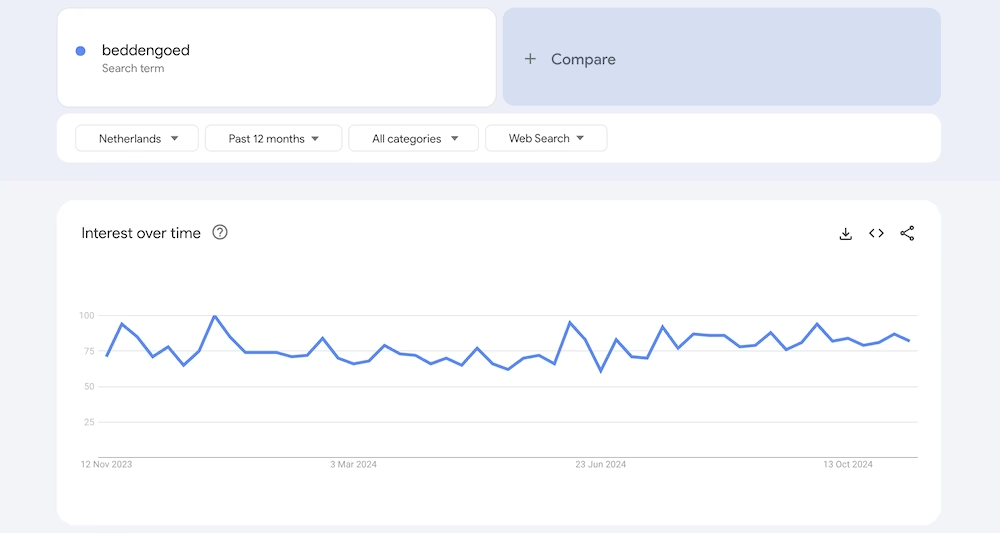
It comes down to a simple calculation: search volume, competition, and profit margin of your product. If there are few monthly searches, the sales potential is limited. However, if you sell products with a high price and a good margin, it can still be worth it.
Is there a lot of volume, but is it highly competitive? Then you have to wonder if you can break through.
You are literally looking for the gap in the market. If there are already many other webshops selling precisely the same product you have in mind, the chance of you breaking in is minimal.
My personal tips for choosing a product:
- Start small. Initially, choose no more than a handful of products that all fit together well. Keep product variations to a minimum at first to keep operations as streamlined as possible.
- Focus on quality. Large webshops like bol.com and Alibaba sell a lot of products with low margins. That works for them because of the enormous scale they operate on. But as a starting webshop owner, the financial picture likely won’t add up. Instead, focus on high-quality products with higher margins. Take the Dutch webshop Suite702 as an example.
- Choose a product you’re interested in and would use yourself. Sure, you mainly want to follow the opportunities. “Passion” doesn’t pay the bills. But if you can, choose a product you stand behind and would want to use yourself (or already do). That makes selling it a lot more fun.
- Also consider digital products. A webshop doesn’t have to sell physical products. Do you have certain knowledge, like playing the guitar? You could package this into an online course and sell it.
2. Come up with a business name and register the corresponding domain
Coming up with a business name is not very easy.
Ideally, it should be catchy, unique, and memorable. Additionally, you should be allowed to choose the name: it can’t be too similar to a competitor’s.
A few things to consider:
- Choose a short and simple name that is easy to spell and pronounce
- Avoid complicated words or names that are too long
- Consider your niche and target audience: what appeals to them?
- Use words that match the style or values of your webshop
- Consider a name that clearly indicates what you offer – this helps customers understand immediately what you stand for (for example, DeNotenShop.nl is, in my opinion, a perfect name for a webshop)
- If you are targeting the Dutch market, a Dutch name can come across as trustworthy and appealing
Once you have chosen a business name, it is necessary to register the corresponding domain name.
You can check via my.host if your desired domain name is available.
3. Choose an ecommerce platform
You can create a webshop in different ways. Here we will look at the options available to you.
The crucial question: do you choose a website builder or WordPress?
Broadly speaking, as a non-technician, you can create a webshop in two ways:
- You use a website builder like Shopify, Wix, or JouwWeb
- You use an open source CMS like WordPress with WooCommerce (WooCommerce is a free plugin that allows you to add a webshop to your site)
As a rule of thumb, you can say that a website builder is slightly easier to master, but both more limited and more expensive than WordPress.
Furthermore, in terms of SEO, you can do less with a website builder than with WordPress.
Choosing a website builder also means you bind yourself to a closed system. If the platform’s rules change, there’s nothing you can do about it.
Think, for example, of a price increase. With a WordPress site, you can still switch hosting providers.
With a website builder, you could change platforms in such a case, but you’ll have to build your webshop completely from scratch again.
My recommendation: go for WordPress with WooCommerce
I eventually chose to build my own webshop with WordPress and WooCommerce.
Years later, I am still satisfied with this. It gives me complete freedom regarding the functionality of my webshop. It also feels like I actually own my webshop, instead of renting it from a closed platform.
My personal tips for building a webshop with WordPress:
- Choose a reliable yet affordable web host. Ultimately, there are often quite a few costs involved in starting up a webshop. The key is to keep these costs as low as possible initially. The good news is that for a starting webshop, your hosting costs can remain quite modest. At my.host, you can get an appropriate webshop hosting package for €4.99 per month in the first year.
- Opt for a multifunctional WordPress theme. The advantage of WordPress is that you can create practically any site you can imagine with it. As long as you choose the right theme: some themes restrict your site in terms of functionality and design possibilities. I advise choosing a lightweight, multifunctional theme like Kadence or GeneratePress. These themes also have excellent free versions.
4. Work on your brand
It’s wise to start thinking about the direction you want to take your brand from the very beginning.
Everything must fit together: your logo, color scheme, images and photos, social media, and so on.
My experience is that if you don’t think this through properly from the start, things are likely to go wrong sooner rather than later. This then has a negative effect on the trust your webshop exudes, which can hinder your conversions.
They are somewhat clichéd terms by now, but it is wise to put your mission and vision on paper.
What does your webshop stand for? What are the core values? Why should customers choose you and not another webshop?
This is not only reflected in the design of your website but also in your copywriting.
5. Provide your webshop with content
Now it’s time to provide your webshop with written and visual content.
Product photos and descriptions
This is where you want to invest most of your time and effort. Ultimately, it’s most important that your product pages rank high in search engines, and it’s where conversions are made.
People are visual creatures. So, make sure your product photos stand out as much as possible. Provide sharp, clear photos from multiple angles so that visitors get a good impression of what they’re buying.
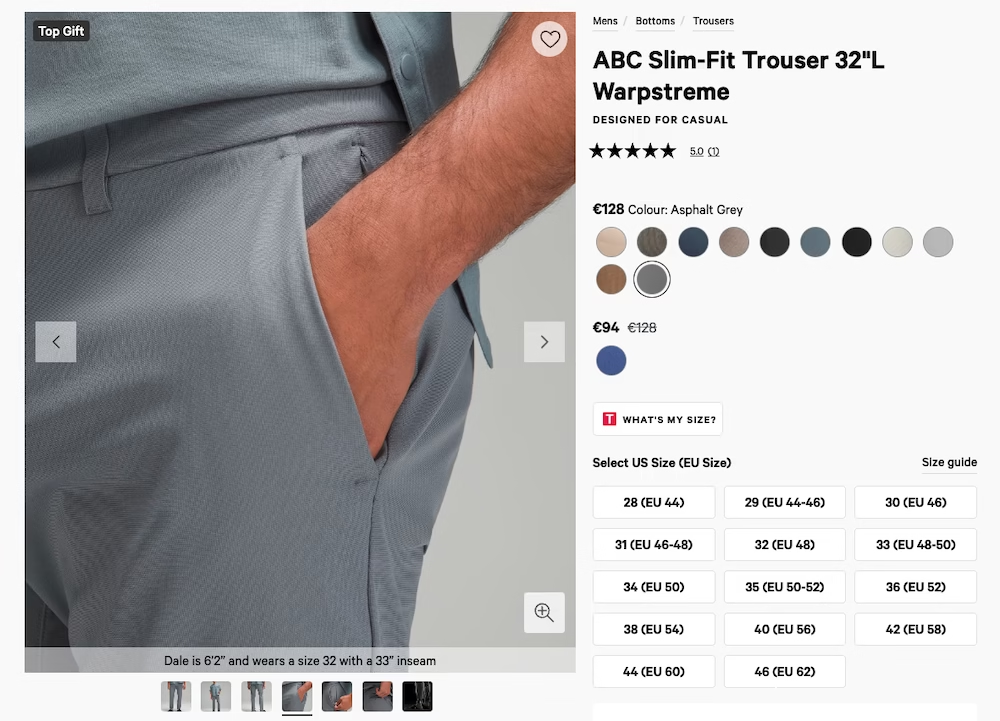
Use descriptions that not only list the product specifications but also emphasize the benefits. What solution does the product offer? How does it improve your customers’ lives?
Blogs and guides
Blogging regularly and sharing useful guides can help your webshop become more visible in search engines and build authority in your niche.
Write articles that answer your target audience’s questions and offer practical tips. For example, if you have a clothing webshop, you can share styling tips or discuss fashion trends.
From these articles, you can then link to your product pages.
An About Us page and contact information
An About Us page gives you the opportunity to tell the story behind your webshop. Explain who you are, what your webshop stands for, and what makes your products unique. This can help create a personal connection with your visitors.
This page is especially important in the beginning. People will not yet be familiar with your brand. They will be relatively inclined to check who exactly is behind the webshop where they are about to make a purchase.
Don’t forget to provide clear contact information, such as an email address, phone number, and a contact form, so customers can easily reach you with questions or issues.
Don’t hide this somewhere in a corner of your website: make it front and center so your visitors can see you’re truly customer-focused.
The boring but necessary disclaimers
These pages aren’t very exciting to put together, but they are absolutely necessary.
Every webshop needs legal disclaimers and conditions, such as a privacy policy, return policy, and terms and conditions. These documents not only protect your business but also ensure clarity and trust with your customers. Make sure these pages are easy to find in the footer of your website, so that customers can quickly find the necessary information if they have questions.
6. Devise a marketing strategy
It would be nice if you could launch your webshop and people would flock to it without you having to lift a finger. But unfortunately, that’s not how it works in practice.
To make people aware of your webshop, you will need to come up with and execute a marketing strategy.
Marketing channels
First of all, it’s important to be aware of the available marketing channels. The most well-known ones are:
- SEO. In other words, search engine optimization. This involves publishing valuable blog articles that align with the products you sell. Many webshops focus on this, but it usually takes several months before you see the results of your efforts.
- SEA. This stands for Search Engine Advertising. By bidding on keywords, you can get straight to the top of Google’s search results. It is a powerful channel that can deliver immediate results. Nonetheless, it may take some time before you make this channel profitable.
- Social media. Think Instagram, Facebook, or TikTok. You can dive into this both organically (unpaid) and through paid ads.
- Newsletter. A perfect way to maintain a direct and personal line between you and your customers. Ideal for keeping your customers informed about new deals.
- Offline advertising. Think of posters at bus stops, etc. Most webshops that get into this are already quite established.
My personal tips for managing a marketing strategy:
- Initially focus on one or two marketing channels. You can market in countless ways: via SEO, paid search engine ads, social media, collaborations with influencers… Each marketing channel is an art in itself and requires time, effort, and sometimes money to master. Spreading your attention across many channels will likely make you fail in each one. Focus is better.
- If it suits you, go all-in on SEO as a channel. Affiliate blogs are systematically removed from search results by Google. At the same time, you see webshops with the exact same content ranking in the search results. Google seems to have a preference for ecommerce sites over pure content sites. Take advantage of this. Don’t know anything about SEO yourself? Then consider collaborating with an SEO expert.
7. Don’t forget to register with the KvK
As the owner of a webshop, you always need to have a KvK registration.
You might wonder when the best time is to do this: before or after setting up your webshop?
Personally, I would do this somewhere in the middle of the process. I would want to have at least conducted the market research for a product, registered a domain name, and set up the webshop first.
Why do all those things before a KvK registration? To be sure you want to go through with it.
Registering with the KvK comes with responsibilities regarding the tax authorities. There are also costs involved.
If you find out while working on your webshop that you don’t really want to continue with it or that the product you had in mind isn’t viable, you’ll have to dissolve your KvK registration again.
But remember: at the moment your webshop starts generating revenue, you always need a KvK registration.
It’s useful to also be aware of some new rules regarding online sales, watch this video of the Dutch Chamber of Commerce (KvK): https://www.youtube.com/watch?v=F1gSfQJnF6I



Leave a Reply