


A subdomain is an addition to your primary domain name, intended to organize the content of your website and simplify navigation for users.
For example, if you have a website with the address example.nl, a subdomain might look like this: blog.example.nl. Here, ‘blog’ is the subdomain that directly refers to a specific section of your website, in this case, a blog.
In the structure of a URL, the subdomain plays a role in the hierarchy before the domain name. It acts as a separate entity and can be used to host different sections or functions of your website.
With subdomains, you can divide your website into logical parts without needing to register multiple domain names. This is not only cost-effective but also improves the user experience and helps search engines better understand your website.
It is important to note that each subdomain can be considered by search engines as a separate website. This has implications for any SEO strategy since subdomains can build their own authority, separate from the main domain name.
You can indeed use subdomains to enhance specific parts of your online presence and focus on certain content or services.
Understanding what a subdomain is
Watch this video for a visual explanation.
Definition and structure of a subdomain
A subdomain is a subdivision of your main domain, allowing you to create space for different sections or services within your website.
It is an addition to the domain, such as blog.yourdomain.nl. Here, ‘blog’ is the subdomain, ‘yourdomain’ is the second-level domain (SLD), and ‘.nl‘ represents the top-level domain (TLD).
Typical uses of subdomains
Subdomains are often used to create separate sections on a website, such as a blog (blog.yourdomain.nl), an online store (shop.yourdomain.nl), or a test environment (test.yourdomain.nl). This structuring aids in SEO by allowing each subdomain to be seen as a separate entity by search engines.
Technical functioning of subdomains
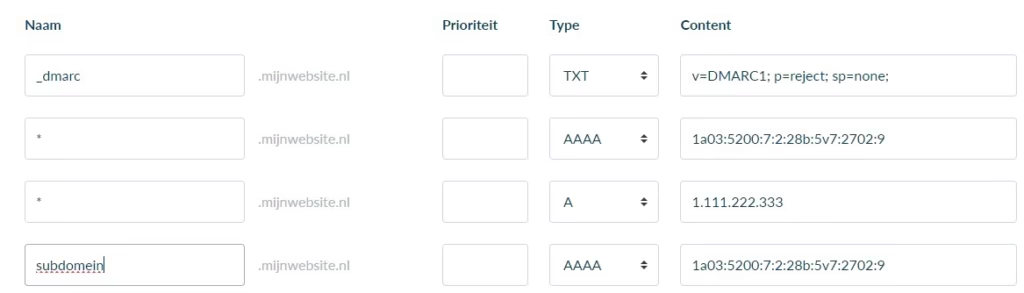
Subdomains are set up in the DNS (Domain Name System), via DNS records such as A-records and CNAME. An A-record links a domain to an IP address, while a CNAME record refers an alias of the domain to another name. The DNS ensures that when users enter a subdomain URL in their browser, they are redirected to the correct server.
The difference between subdomain and subdirectory
While a subdomain acts as a unique web address with its own DNS records, a subdirectory functions as a folder within a main domain, such as yourdomain.nl/blog. A subdirectory is also known as a subfolder or directory and is part of the original URL, without DNS changes. This distinction is crucial for the organization and SEO strategy of your website.
SEO and subdomains
When using subdomains for SEO, you must consider the structure and content. Subdomains can be seen as separate entities by search engines like Google, which has both advantages and disadvantages for your search engine optimization (SEO) efforts. For a clear overview, use:
- User-focused keywords in your subdomain name to enhance relevance.
- A consistent navigation structure across subdomains.
Creating and configuring subdomains
For creating and configuring subdomains, you will need access to the control panel of your server. Follow these specific steps:
- Log in to the control panel.
- Navigate to the ‘Subdomains’ or ‘Domain Management’ section.
- Enter the desired subdomain name and link it to the corresponding directory on your server.
- Configure DNS settings if needed, so users and machines can access the subdomain.
A clear structure with a separate subdomain for test environments and one for live versions contributes to a clear separation of development and production.
Domeinnaam bestellen?
Een goede naam zorgt voor een goede website.




Leave a Reply