

With a globally increasing online presence, the dark side of the internet also emerges. The amount of online crime is increasing by the minute, making it increasingly important to pay extra attention to the online security of their data, servers, and websites.
WordPress is still one of the most popular platforms to build websites on and offers everything an organization or individual needs to get a well-structured website online. This also means that many hackers delve into how they can bypass WordPress security.
Fortunately, there are plenty of measures you can take yourself to ensure that your WordPress website is a digital fortress; and we explain them in detail below!

The importance of online security
Just as a castle lord is constantly vigilant to protect his castle, you as a website administrator must constantly be alert to keep the digital gates closed and protect your online properties from intruders. If you don’t pay constant attention to this, you may create weak spots in your website that hackers and online criminals will gladly exploit.
The danger of poor online security is that a lot of sensitive data can end up on the street. The risk varies by website and what kind of data is entered on the website. If you have a web store or forms that ask for personal data, it is extra important to do everything you can to ensure that this information remains safely under lock and key.
The simplest steps for strong security
Fortunately, decent cybersecurity doesn’t have to be complicated; it just requires a little attention. One of the most important steps you can take is to regularly update your WordPress, themes, and plugins. This ensures that you are using the most recent software, which also includes the security aspect.
Automatic Updates in WordPress
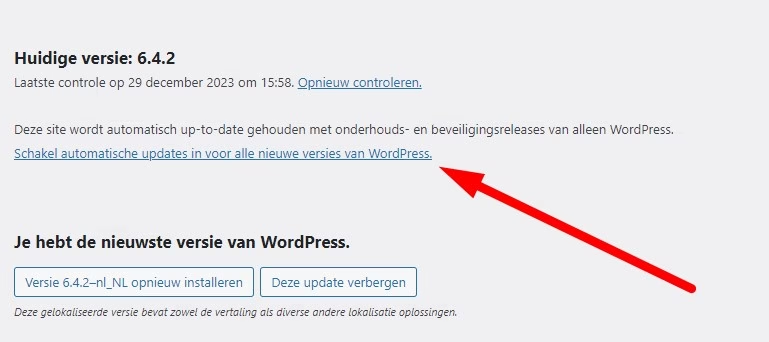
Now, this sounds like you have to manually update all plugins and themes for an hour every week, but fortunately, in your WordPress backend, you have an option with ‘Enable Automatic Updates.’ If you check this option behind the installed plugins, you will have to pay much less attention to this, and it will significantly boost your site’s security.
A strong password for your WordPress
This one is almost self-explanatory, but a strong and complex password can work wonders for your site’s security. A password with many (read) characters, numbers, and upper and lowercase letters quickly makes a strong password.
If you have trouble remembering these passwords (because ideally, you never use a password more than once), you can also use a Password Manager, such as Dashlane, for example. It is also advisable to change your passwords regularly.
Two-factor authentication on your WordPress website
A strong password is quite something, but if you want to do it right, you can install two-factor authentication (2FA) on your site. This means that, in addition to your password, you have to take an extra step to log in. The second step could be:
- Receiving a code in your email
- Receiving a code in an SMS
- A biometric scan (fingerprint)
- Linking an authentication app (such as Google Authenticator)
There are plenty of apps and plugins in WordPress that offer good options for this, and what type of 2FA plugin you ultimately choose is obviously a completely personal choice.
Extra tips for good WordPress security
A few more steps you can take to properly secure your website include obtaining an SSL certificate or purchasing the very best WordPress Hosting with the highest level of cybersecurity.
An SSL certificate on your WordPress website
An SSL certificate is a digital file that applies encryption to the data exchange between a website and its visitors. It ensures a secure, encrypted connection, protecting confidential information such as passwords and payment details from unauthorized access and cyberattacks. It also instills a lot of trust in visitors.
A secure login on WordPress
Additionally, you can limit the number of login attempts to ensure that hackers do not have free rein to try to guess your password as often as they want.
By setting a limit on this, you ensure that after an X number of failed attempts, they must wait before trying again. This can be done, for example, via the Limit Login Attempts Reloaded plugin. Moreover, you can add a reCAPTCHA to your login page to counteract the effect of automated attacks.
It’s also wise to remove old plugins and themes that are no longer used and are therefore redundant.
Now that we have everything online, from personal photos to financial transactions, it is becoming increasingly important by the day to pay attention to securing this information. With these simple and handy tips, you can ensure that your WordPress website is always up to date with the most recent versions of your plugins and themes.
You don’t have to be a cybersecurity expert to set up a strong online defense against the increasing number of online criminals. As long as you pay some attention every now and then, you’ll go a long way in securing your sensitive data. By following these tips, you can avoid the bulk of the dangers and reduce vulnerabilities! Do you need more for your WordPress site? Such as hosting, a domain name or a VPS? We are happy to help you get started!
WordPress hosting bestellen?
Makkelijk, snel & veilig je eigen WordPress website.


Leave a Reply