


Nowadays, there are a tremendous number of domain names. For this, you have different layers (also called subdomains). It is common to manage all those domains in a so-called “DNS“, a Domain Name System. If you need to make changes within your DNS, then the AAAA record also comes into play.
What exactly is an AAAA record and what do you do with it?
We understand that these terms need some explanation and clarification. Therefore, read in the article below how to use such an AAAA record within your DNS, what different records there are, and of course what exactly an AAAA record is.
How to use an AAAA record properly
An AAAA record has several functions that are fairly simple to understand. The main function is in pointing subdomains to an IPv6 IP address.
When you add or change a domain or subdomain to your DNS, it needs to be linked to an IP address, which used to always be IPv4 addresses, but these are gradually running out. That’s why IPv6 addresses have been introduced, of which there are so many available that they are basically inexhaustible (around 50 quadrillion per person on this planet).
Setting up an AAAA record
There are several steps you need to follow to use an AAAA record effectively on your domain. We outline them step by step for you:
- Step 1: Log in to your account and go to your products;
- Step 2: Go to the location where you manage and host your domain;
- Step 3: Click on the domain name for which you want to adjust the DNS (to AAAA record);
- Step 4: Within this domain name, go to the DNS management system and add a new domain name;
- Step 5: Click on the type “AAAA (record)” and then click add;
- Step 6: Fill in all other details such as the new domain name correctly and make sure to click “save”.
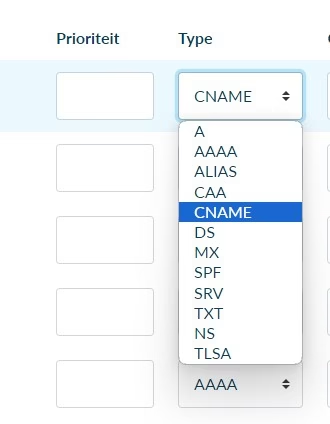
Which DNS records exist besides the AAAA record
In addition to the AAAA record, there are many other records that can be used. Think of over 10 other records you can use within your DNS. We briefly explain 3 of them for you:
A-record
This is most similar to the AAAA record and stands for “address record”. It is also used to link a domain name to your IP address. The difference is that the A-record does this for IPv4 addresses.
CNAME-record
You use this record when you want to refer to another domain. Think, for example, of linking a subdomain to a regular domain.
NS-record
You use this when you want to redirect your domain name to a completely different nameserver (another DNS).
Summary: what exactly is an AAAA record?
An AAAA record is actually not that complicated. It basically has the same function as an A record, but is more modern.
While A records link domain names to IPv4 addresses, AAAA records do this for IPv6 addresses. This is simply because there are more of them available compared to IPv4 addresses.
Domeinnaam bestellen?
Een goede naam zorgt voor een goede website.




Leave a Reply