


Many owners of domains and/or DNS Zones use so-called “A records” to easily link domains to IP addresses. With A records, you link domain and subdomains to IPv4 addresses.
We understand that you might be wondering what an A record exactly is and how exactly you use it. That’s why in the article below we answer all your questions and delve into the use of A records within your DNS.
What exactly is an A record and what is it good for
An A record, also known as an “address record,” is the most used record in DNS Zones and nowadays is indispensable in the minds of many website administrators. It is often crucial for your hostname and setting up a DNS, as you can create different links and references when you later establish (sub)domains that also need to be linked.
An A record provides you with information about the IP address (IPv4) of your domain name or names. Sometimes you need to create an additional link between the domain name and the IP address of the company to which the domain name belongs. You do this, among other things, with an A record, but it has more functions.
What is an A record all good for?
Besides referring to hostnames and domain names, consider using multiple A records on the same domain name as “fallbacks” and “redundancies.”
Additionally, you also have the option to give each (sub)domain under one overarching domain a separate A record name, which then refers again to the same IP address.
How do you exactly apply A records in your DNS
The application of A records sometimes differs slightly per domain host. Yet the foundation is often the same, and we explain it to you step by step below:
- Step 1: Log in to your account and choose the correct product (if you have multiple);
- Step 2: Go to the section “manage and host” to add or modify domain names;
- Step 3: Click on the domain name for which you want to adjust or add an A record in your DNS;
- Step 4: Within this domain name, choose the DNS management system you use and add a new domain name;
- Step 5: Click on the record type “A (record)” and then on add or confirm;
- Step 6: Fill in all other details such as the new domain name (www.yourdomain.nl) correctly and make sure you click on “save”;
- Step 7: Check if you have filled in everything correctly and voilà, your A record is added and in use.
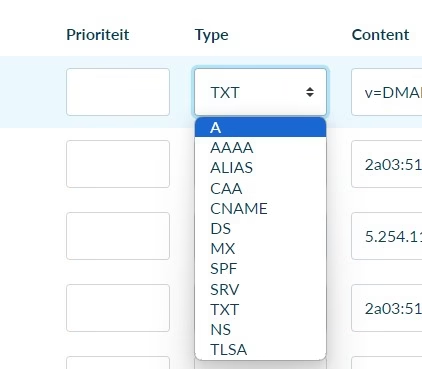
Note: it’s good to know that an A record is a bit different from an AAAA record.
Get started with A records in your DNS Zones
Now that you know what A records are and how to apply them practically within your domain and subdomains, it’s time to get started. We are happy to assist you with additional questions or when you need a little extra support.
Questions about something other than A records and/or DNS Zones? Then check out our other blogs or knowledge base articles on this page!
Domeinnaam bestellen?
Een goede naam zorgt voor een goede website.




Leave a Reply