


A permalink: a term you’ll often encounter when dealing with WordPress. But what does it actually mean, how does it affect your SEO, and how do we use this in WordPress?
What is a Permalink?
A permalink, also known as a permanent link, is the unique URL that you can use to visit specific web pages. Simply put, it’s the web address of your page.
When the internet first started, permalinks weren’t as structured as they are now. They were often complex and difficult for users to understand.
With the advent of search engine optimization (SEO), the structure of permalinks became increasingly important.
A clear, search engine-friendly permalink can impact your website’s discoverability in search engines.
Permalinks in WordPress
In WordPress, permalinks are the permanent URLs to your individual blog posts, pages, categories, and other content. They are essential for SEO and user-friendliness. Fortunately, WordPress offers users a lot of flexibility when it comes to choosing and customizing the permalink structure.
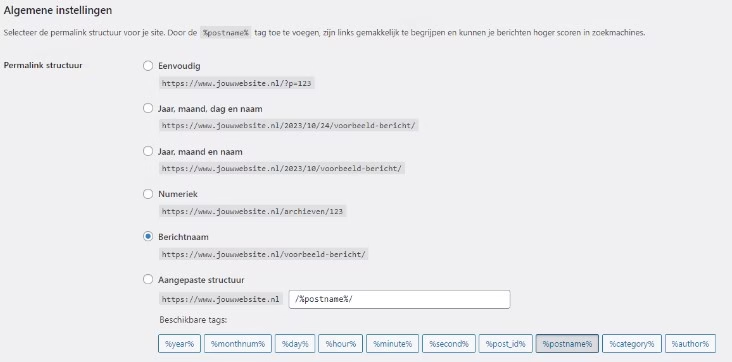
Available permalink options in WordPress:
- Default
- Example: http://yourwebsite.com/?p=123
- This is the default setting where posts receive a unique number. It’s not very SEO-friendly and is often avoided.
- Day and name
- Example: http://yourwebsite.com/2023/10/24/example-post/
- This structure is clear and shows the publication date, which can be useful for news-oriented websites.
- Month and name
- Example: http://yourwebsite.com/2023/10/example-post/
- Similar to the previous one, but without the day. Still time-bound, but a bit shorter.
- Numeric
- Example: http://yourwebsite.com/archives/123
- This is a straightforward approach where each post gets a unique number. However, it lacks context and is therefore not ideal for SEO.
- Post name
- Example: http://yourwebsite.com/example-post/
- One of the most popular and recommended structures. It is concise, SEO-friendly, and provides a clear indication of the content of the post.
- Custom structure
- This allows users to define their structure using available tags, such as %postname%, %category%, %year%, etc.
Choosing the right permalink structure in WordPress is crucial for both SEO and user experience. It’s important to choose a structure that reflects both the content of your website and is easy for visitors and search engines to understand.
Adjusting permalinks is easy in WordPress, but it’s always a good idea to stick with the initial setting to avoid ‘broken links’. If you ever need to change the structure, make sure to set up redirects to prevent any issues.
Permalinks and SEO
A quick word on permalinks and SEO. Think of permalinks as your home’s address on the internet. If your address is clear and accurate, visitors (and mail carriers) can find you more easily. The same goes for search engines.
- Readability: Google loves clarity. A clean, understandable permalink like yoursite.com/tips-for-cooking is easier for both humans and search engines to understand than yoursite.com/postid=1234.
- Keywords: If you include important keywords in your permalink, it immediately tells Google what your page is about. But don’t overdo it; keep it natural.
- Sharing: People are more likely to share a link that looks good and is easy to read. And sharing can lead to more backlinks, which is great for your SEO.
So, what should you do?
- Choose a clear structure and stick with it. Inconsistency can be confusing.
- Avoid using dates in your permalinks unless you’re a news site. Dates can make content seem outdated, even if you regularly update it.
- Be careful when changing permalinks of existing pages. This can lead to ‘broken links’ unless you use redirects.
In short, take a moment to set your permalinks correctly. It’s a simple step that can significantly improve your SEO. And remember: it’s all about clarity and relevance.
Be careful when adjusting your permalinks
Adjusting permalinks can be tempting, especially if you want to update an older post or improve the URL structure. But before you do this, it’s good to consider the following:
- Broken links: if you change a permalink, the old URL becomes invalid. This means that anyone clicking on the old link will encounter a ‘404 Not Found’ error. This is not only frustrating for visitors but can also be damaging to your SEO.
- Loss of ‘link juice’: If other websites link to your page and you change the permalink, all the built-up ‘link juice’ (the SEO value passed through those backlinks) is lost.
- Loss of social shares: If you have social media counters on your website, the numbers reset when the URL changes. It can then appear as if no one has ever shared your content.
What can you do then?
- Use 301-redirects: If you decide to change a permalink, make sure to set up a permanent 301-redirect from the old URL to the new one. This will automatically redirect visitors to the new URL and retain much of the ‘link juice’.
- Plan ahead: Try to get your permalink structure right from the start. If you have a clear, logical structure, you’ll be less likely to need changes later.
- Double check: Before making any changes, check if there’s really a good reason for it and if you’ve considered all possible consequences.
Hosting bestellen?
Kies voor de snelheid, gebruiksgemak en service van mijn.host.



Leave a Reply