


Behind the scenes, a lot of work has been done on the new Control Panel of my.host. In this article, we’ll quickly go through what’s changed and also tell you why.
Completely self-built and independent
At my.host, we believe it’s important not to be too dependent on external suppliers. Suppliers can change their policies at any moment and, more importantly, their prices. We want to be ahead of this and have therefore been using our own control panel since day one. Even more important is that we have the freedom to take you as a customer seriously when there is feedback instead of passing this on to the supplier. The chance is then high that your request gets lost at the bottom of the pile.
We are eager to listen to feedback from our customers and try to address it as quickly as possible, and you’ll read more about this later in the article.
Even more efficient with everything in one place
During development, we focused on making the new interface more efficient. Otherwise, change has no added value and wouldn’t be considered progress.
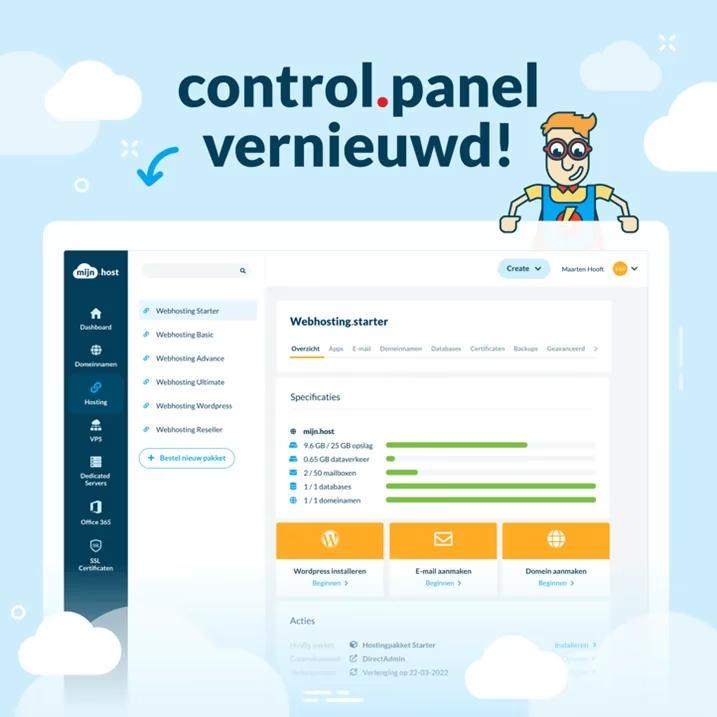
What immediately stands out is the continuity of the screen’s flow. On the left, you find all the tabs from domain names to SSL certificates. Move a bit to the right, and you’ll find more information and a little further all details like, for example, the DNS settings of a domain name. This feels very intuitive because you always read from left to right.
Mobile optimized
Want to quickly make a DNS change or purchase an extra hosting package in the Control Panel? This can now be done even better on the go with the mobile-optimized Control Panel. We developed it simultaneously with the PC version so it feels exactly the same as the regular version.
2FA
2FA is a feature that was already in our previous Control Panel, not all customers had found it or were using it. We have now placed the 2FA under the account settings, and you can activate it using a slider.
Try it yourself
Curious about our Control Panel? The new Control Panel is now live at my.host/cp/.



Leave a Reply