


The reason you need a caching plugin is simple: you can make your website significantly faster without needing technical expertise.
Each WordPress caching plugin works roughly as follows. The caching plugin stores a ready-made version of your web pages, so the server doesn’t have to generate them repeatedly. When a visitor accesses your site, they see the stored version immediately, which significantly reduces load time. This reduces the server load and ensures a faster and smoother user experience.
That said, there are significant differences between caching plugins in terms of user-friendliness, cost, and actual performance. I have reviewed the most popular caching plugins and present the top 5 options here.
The best WordPress caching plugins
The ideal caching plugin for your site depends on various factors. This is especially relevant if your host doesn’t use LiteSpeed, as in that case, LiteSpeed Cache is generally the best choice.
Which plugin works best is influenced by the web server you use, the type of website you run, the WordPress theme installed, and the settings you’ve activated or disabled. What works excellently for one site may be less effective for another.
Do you really want to know what works best for your website? Then it’s wise to compare a few of the plugins mentioned below yourself. Try a few and use tools like GTMetrix or Google PageSpeed to measure performance. Additionally, open your site in an incognito window and assess how fast it feels to you. Speed tests don’t always provide the full picture of how a site actually feels to your visitors.
LiteSpeed Cache

Cost: free
Active installations: 6+ million
Rating: 4.8/5 (2500+ reviews)
When using LiteSpeed hosting, be sure to use LiteSpeed Cache.
DID YOU KNOW: my.host uses LiteSpeed for all their packages? Switch to LiteSpeed hosting for a few euros per month.
With a rating of 4.8/5 in the WordPress plugin directory and over 6 million active installations, LiteSpeed Cache is one of the most loved and most used WordPress plugins.
It is fast, comprehensive, easy to use, and completely free.
LiteSpeed Cache offers fast server-side caching (the other plugins in this overview do not) and has a huge company behind it that continually improves the plugin.
Unique features
- Server-caching. This is something you rarely encounter with caching plugins. The advantage of server-side caching is that it significantly reduces processing time and server load, making your website load much faster.
- Guest Mode + Guest Optimization. Improves load time for new visitors. Guest Optimization goes a step further by applying additional optimizations to pages and images.
- Public + private caching. LiteSpeed offers various options to manage the public cache (pages everyone can see) and the private cache (pages that may vary per visitor) separately.
- ESI (Edge Side Includes). Manages how specific elements on dynamic pages are cached. Only adjust this if you know what you’re doing because incorrect configuration can slow down your website.
- TTL settings. Most cache plugins offer much less extensive TTL settings than LiteSpeed Cache.
- UCSS (Unused CSS Removal). Removes unused CSS and loads used CSS more efficiently in a separate file.
- Image optimization. The biggest difference with LiteSpeed is LQIP (Low Quality Image Placeholder), where a blurred, reduced version of an image is loaded as a temporary placeholder. This reduces CLS (Cumulative Layout Shift). Additionally, the plugin can compress images, remove EXIF data, and use WebP.
- Gravatar cache. Especially useful if your blog contains many comments with Gravatars.
- Crawler. Scans your website for pages whose cache has expired and refreshes it. However, be cautious with this feature: it can put a significant load on your server resources.
Do the above terms mean little to you? Don’t worry. LiteSpeed Cache has several ready-made settings that you can activate with a single click. So even as a complete beginner, you can use LiteSpeed Cache without any problems.
However, for the very best results, it’s worth diving into the settings yourself.
FlyingPress
Cost: from $49 per year (for 1 website)
Active installations: n/a
Rating: n/a
According to Chrome’s UX report, WordPress sites using FlyingPress top the charts when it comes to Core Web Vitals.
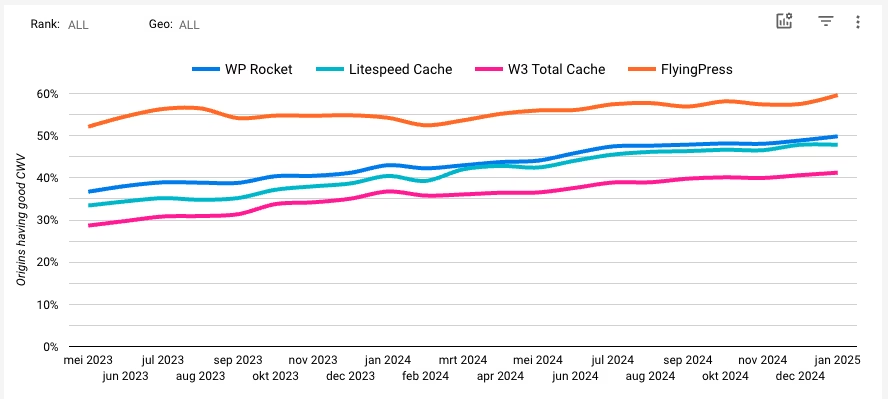
This doesn’t say it all, of course. FlyingPress is a caching plugin that is generally used by users who are a bit more technically inclined. And therefore probably also have a faster WordPress theme and faster hosting than the average WordPress user. Nevertheless, it’s an impressive achievement.
The plugin is run by a small team that is quick to add new features. Flying Scripts and Flying Pages were the first plugins to delay JavaScript and smartly preload pages, something later adopted by WP Rocket. Even now, FlyingPress does things other cache plugins can’t: lazy rendering HTML elements, self-hosting YouTube placeholders, and lazy loading background images using the lazy-bg helper class.
Unique features
- Pre-load critical images. Automatically detects images in the viewport and pre-loads them. Because these images can vary per page, manually pre-loading is time-consuming and often leads to unnecessary pre-loading of unused images.
- Exclude top images from lazy loading. Instead of manually excluding certain images from lazy loading, FlyingPress allows you to set, for example, the first 2-3 images above the fold to be automatically excluded. This works better than a fixed list because these images can vary per page. Manual exclusion remains possible too.
- Preload pages. Flying Pages (integrated into FlyingPress) does link preloading better than, for example, WP Rocket and has smart features to prevent CPU load.
- Lazy render HTML elements. This works similarly to lazy loading for images but for any HTML element (such as the footer, copyright section, or comments). The documentation explains how to copy the selectors of elements you want to lazy render in Chrome DevTools and add them to FlyingPress. This seems to be the only cache plugin that supports this.
- Lazy load background images. With FlyingPress, you can easily add the class lazy-bg to background images to lazy load them. Many other caching plugins require a more cumbersome process, such as moving background images to inline HTML, or it may not be supported at all. This can lead to errors with “defer offscreen images” in PageSpeed Insights.
- Host fonts locally. Hosting fonts locally is faster, especially if you preload them. Most cache plugins do not support this by default.
- Host YouTube placeholders locally. When you embed YouTube videos, the thumbnail is usually loaded from i.timg.com, which causes an external request. Therefore, the image cannot be cached, served via a CDN, and may lead to errors in PageSpeed Insights. FlyingPress solves this by automatically downloading and hosting the image locally.
WP Rocket

Cost: from $59 per year (for 1 website)
Active installations: n/a
Rating: n/a
WP Rocket is probably the most well-known name in the world of WordPress plugins. They are still excellent but nowadays fall a few steps behind the two caching plugins above.
WP Rocket is used by millions of people and therefore has excellent documentation and a very lively Facebook group. This means you can get the most out of this plugin without too much effort.
A few things to keep in mind:
- The plugin still does not offer image optimization. You will need a separate plugin for that.
- They focus a lot on the speed test tools – but not enough on how real users experience your website.
- The features lag behind those of LiteSpeed Cache and FlyingPress.
Unique features
- Delay JavaScript. WP Rocket automatically defers JavaScript based on their own rules, after which you have to exclude the JS files that break your site.
- Remove unused CSS. WP Rocket is slightly slower than alternatives because it places unused CSS inline instead of loading it in an external stylesheet. This can not only break websites but also increase CPU usage or simply not work at all if the server crashes. It is also not really a unique feature, as LiteSpeed Cache and FlyingPress do this too – and better.
- Helper plugins. WP Rocket offers several handy plugins to further adjust the operation of the cache plugin.
W3 Total Cache
Cost: Free (premium from $99 per year for 1 website)
Active installations: 1+ million
Rating: 4.4/5
W3 Total Cache is an old hand when it comes to caching plugins. The plugin has a free version and a premium edition (which I find slightly too expensive).
They have added a setup guide that tests your site with Redis, Memcached, or other settings like disk: enhanced, and then shows which option provides the most savings. The minify settings now offer the ability to defer (defer) or asynchronously load (async) JavaScript. Additionally, they have added various image optimizations, such as lazy loading, image compression, and WebP support via their free image service extension. Nice improvements indeed.
Don’t have LiteSpeed hosting, and don’t want to pay for a caching plugin? Then this is your best choice. But the paid version is, in my opinion, too expensive for what you get.
Conclusion: use LiteSpeed Cache if possible
Caching plugins like FlyingPress and WP Rocket are excellent in principle.
The biggest problem I have with them is the cost: at least $50 per year for a single website. If you run a portfolio of websites, the costs can easily run into hundreds of dollars per year.
Does your web host use LiteSpeed servers? Fantastic. In that case, you can now directly download and activate the free LiteSpeed cache plugin.
Does your web host not use LiteSpeed servers? Then you might consider switching. LiteSpeed hosting is generally cheaper and faster than hosting providers that rely on NGINX or Apache technology.



Leave a Reply